
Agents book appointments at volume, which changes the tool requirements completely. A visa appointment slot finder built for one traveler checking one consulate once a year is the wrong shape for a practice filing every week. Before comparing dashboards, it helps to know what the finder will actually be pointed at, because the consular map of the United States is far more concentrated than most agents expect.
The office map a slot finder has to cover
We counted the offices in our own consulate database: 1,397 office records worldwide, of which 150 sit in the United States, sent by just 18 countries. Mexico alone runs 48 of those 150 offices, roughly one in three. Japan follows with 17, Brazil with 11, and the Philippines and Germany with 9 each. The long tail is thin: 8 of the 18 sending countries run five offices or fewer in the US.
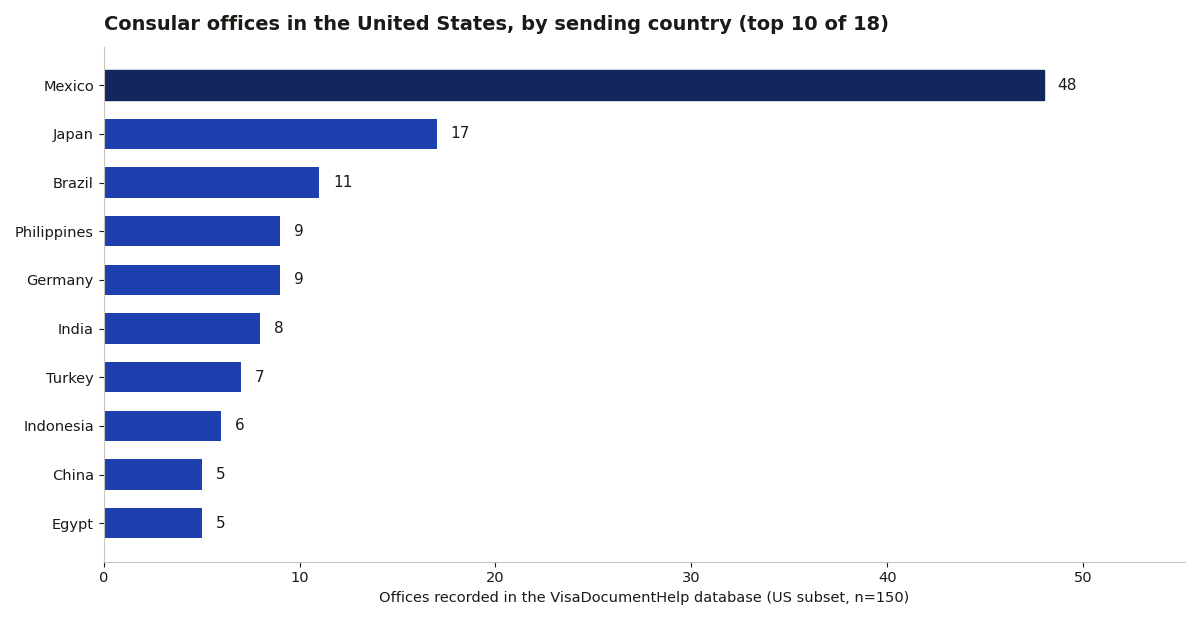
That shape changes what a slot finder needs to do. For a Mexico-heavy practice, the tool lives or dies on coverage of 48 offices spread from El Paso and Calexico to New York and Salt Lake City. Eight of Mexico's offices sit in border cities, including El Paso, San Diego, Calexico, Nogales, McAllen, Brownsville, Del Rio and Presidio, and clients cross for those appointments, so a finder that only watches the big metros misses a third of the real workload. For most other nationalities, the finder is watching a handful of offices, and depth beats breadth: faster checks on five portals beat shallow checks on fifty. Buy monitoring that matches the countries your clients actually come from, not the longest country list in the sales deck.
The metro clusters tell the same story from the other side. The 150 US offices sit in just 56 recorded cities. Washington, D.C. holds 18 of them, New York 16, and Los Angeles, Houston and Chicago 12 each. An agent whose clients cluster in one metro is really running a local practice with a national tool, and the finder's value concentrates in the few portals that serve that metro. The reverse also holds: a client in a state with no office at all will be routed somewhere in that short city list, and the finder has to follow the case there, not to the client's hometown. Japan's 17 offices make the point at country scale: they reach from New York and Los Angeles to Anchorage and Hagatna, so even a single-country practice can span five time zones of portals.
What is still worth comparing
The comparison points from the first version of this guide still hold. Look for multi-client dashboards that track every applicant's appointment status in one view, per-seat pricing that scales with the team, slot monitoring across multiple consulates simultaneously, and document checklists templated per visa type, so a Schengen short-stay file and a passport renewal do not get the same checklist.
The warnings hold too. Watch out for tools that store client passport data without clear security practices, and for "booking services" that are just manual labor with a dashboard skin. The software should reduce work per application, not just display it. Pricing models vary: per-seat monthly for the dashboard, sometimes plus per-appointment fees. For a solo agent doing twenty applications a month, the math usually favors a simple tracker plus slot alerts over an enterprise platform. Buy the tool that matches your volume, not your aspirations.
Point the finder at the right office first
A slot finder watching the wrong jurisdiction is worse than none, because it finds slots your clients cannot use. Start with the consulate database search on this site, which maps each office to the states and regions it covers. Then run the office through Honorary or Real?, the free checker that tells you whether that office type can take the job at all. Office first, jurisdiction second, alerts third.
The agents who get value from these tools treat them as the last step of a lookup, not the first. Count the offices your clients need, confirm each one can take the case, and only then let the software do the refreshing.
Sources: U.S. State Department